Showing posts with label Network & W3. Show all posts

Wednesday, October 23, 2013

Download Youtube videos without using any software

How To Download Youtube Videos Without Using Any Software


1) Go to www.youtube.com . Open the page of the video you want to download.


2) Add "ss" between the www. and the youtube.com section of the URL and hit enter.


Example:


Original YouTube URL:  http://www.youtube.com/watch?v=ykF-rktutV4&list=CLTaJ1PHDR84I&feature=plcp


Modified YouTube URL: http://www.ssyoutube.com/watch?v=ykF-rktutV4&list=CLTaJ1PHDR84I&feature=plcp


3) This will redrect your browser to another site SaveFrom.net :


4) Choose the format of the video. Click on the link of the format .


5) And your download will start in your downloader.

Monday, October 21, 2013

IP messenger in Local network

Program:

@echo off
 :loop
 Cls
 color 02
 echo  IP messenger                          
 set /p ip=IP Address :
 set /p msg=Message    :
 net send %n% %m%
 Pause
 Goto loop

Output:

      IP messenger
IP Address:192.168.3.15
Message:Hello

If any Error occurs / If the above code does not work:

First Your PC should be connected in LAN network
Start-->Run-->Type servives.msc-->hit enter
1)There are many services listed below in Service window
2)Choose Messenger
3)Change Disable into Automatic/Manual
4)Click Start button (It may take few seconds to load)
5)Finally click apply to complete to finish
6)Alright now you have done
7)Now run the program once again

Now enjoy chatting with your friends

Sunday, October 20, 2013

Assign Static IP (IPv4) address for Windows 7

How to assign static IP (IPv4)  address for Windows 7?
1)      Open Control panel
2)      Double click Network and Sharing Center

3)      Click your connections:4

4)      Now your “Connection Status” dialog box will appear.
5)       In the dialog box click properties highlighted below     
  
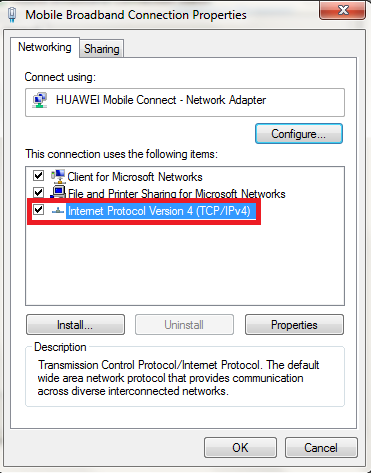
6)      Now the connection properties will appear
7)      Now select Internet Protocol Version 4 (TCP/IPv4). Then click properties

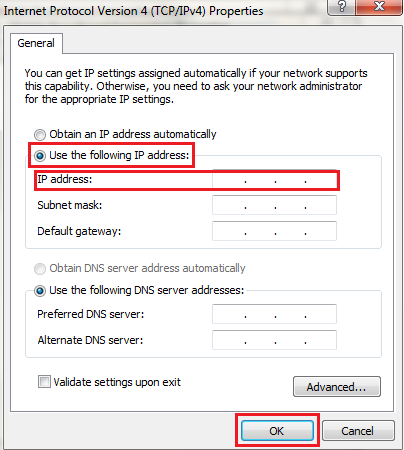
8)      Now you can see IPv4 Properties

9)      Now let choose “Use the following IP address”
10)   In the IP address field type your deserved IP address
11)   Finally click ok
12)   That’s it your Mission Completed